---
title: "Part 8: Managing the status exclusion"
slug: "part-8-managing-the-status-exclusion"
updated: 2022-06-20T09:17:01Z
published: 2022-06-20T09:17:01Z
canonical: "developer.comm100.com/part-8-managing-the-status-exclusion"
---
> ## Documentation Index
> Fetch the complete documentation index at: https://developer.comm100.com/llms.txt
> Use this file to discover all available pages before exploring further.
# Part 8: Managing the status exclusion
## Introduction
In this article we'll look at how to implement state-exclusive between chat and call in Comm100. In the beginning, the agent is in the **online** state and Vincall is the **Available** state: 
When a new chat starts, Vincall's status will be updated to **Do not disturb**: 
When there is a call in progress, the status of the agent is updated to **away**: 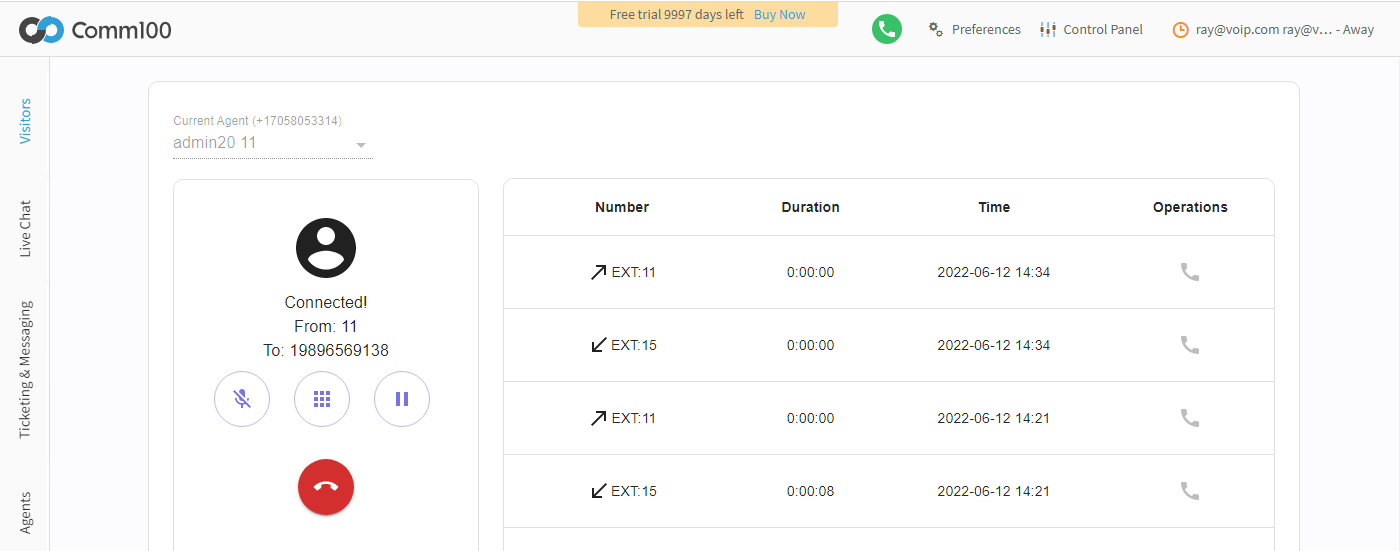
## Step-by-Step Instructions
The interaction between Comm100 and Vincall is achieved through [app client API](https://developer.comm100.com/docs/app-api-reference). Let's step through the state mutually exclusives of chat and call:
1. [Updating the Vincall Status](/docs/part-8-managing-the-status-exclusion#update-the-vincall-status)
2. [Updating the Comm100 Agent Status](/docs/part-8-managing-the-status-exclusion#updating-the-comm100-agent-status)
3. [Bringing Them Together](/docs/part-8-managing-the-status-exclusion#bringing-them-together)
### Updating the Vincall Status
1. Listen for chat events.
When a chat starts or ends, we need to update the Vincall status.
[App client API](https://developer.comm100.com/docs/app-api-agent-console-api-livechat#event) provides the ability to listen for chat events. We'll use `agentconsole.chats.chatStarted` and `agentconsole.chats.chatEnded` events.
In **vincall-portal** project, we can listen for these two events like this:
```
const client = APPClient.init();
client.on("agentconsole.chats.chatStarted", function (args) {
// Update the status of Vincall here
});
client.on("agentconsole.chats.chatEnded", function (args) {
// Update the status of Vincall here
});
```
1. Update the Vincall status.
When a chat starts, we need to set Vincall's status to **Do not distrub**; When there is a chat ending and the current number of chats is **0**, we need to set the status of Vincall to **Available**:
```
const client = APPClient.init();
client.on("agentconsole.chats.chatStarted", function (args) {
// Update the status of Vincall here
setVinCallStatus("Do not distrub");
});
client.on("agentconsole.chats.chatEnded", function (args) {
// Update the status of Vincall here
client.get("currentAgent").then((args) => {
const currentAgent = args.data;
// the current number of chats is 0
if (currentAgent.chats === 0) {
setVinCallStatus("Available");
}
});
});
```
1. Bring them together in Vincall
```
import React, { useEffect } from "react";
import { APPClient } from "@comm100/app-client";
const client = APPClient.init();
const VinCallApp = () => {
const [vinCallStatus, setVinCallStatus] = useState("Available");
useEffect(() => {
client.on("agentconsole.chats.chatStarted", function (args) {
// Update the status of Vincall here
setVinCallStatus("Do not distrub");
});
client.on("agentconsole.chats.chatEnded", function (args) {
// Update the status of Vincall here
client.get("currentAgent").then((args) => {
const currentAgent = args.data;
// the current number of chats is 0
if (currentAgent.chats === 0) {
setVinCallStatus("Available");
}
});
});
}, []);
return (